- If you manage your own computer, update to the current version of RSIGuard (v6.2.15).
- If stretches are disabled, try re-enabling stretches (within RSIGuard, click Setup, Settings, visit the Stretch tab, click Show Stretches During Breaks) and see if the problem repeats.
- Modern versions of RSIGuard use videos in WMV (Windows Media Video) format. You can try using MPG format videos. To do this:
- Click here to download the MPG format RSIGuard stretch videos.
- Double click the downloaded MSI package to install the MPG format videos.
- In RSIGuard, click Setup, Settings and select the Stretch tab. If you've had video issues, modern versions of RSIGuard will show you the options to the right. If you don't see the additional options, and you are using v5.0.4d or later, hold the CTRL key, click on Tools, click Administrator's Access, and enter your organizations Access Code. If you don't know your access code, please email support@rsiguard.com or call Enviance support at 415.332.6433.
- Click on the Mpg option.
- Ensure that "Show Stretches During Breaks" is checked, and click OK.
- Click Tools, Take A Break Now, to see if stretch videos will now play.
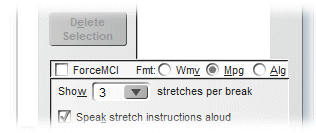
- If #3 doesn't help, go back to the Settings and select the ForceMCI checkbox and try again.
- If #4 doesn't help, go back to the Settings and select Wmv (leave ForceMCI checked) and try again.
- If none of those help, try updating video drivers, Windows Media Player, or related codec software. If the problem started happening right after you installed other new software on your computer, try uninstalling that software or restoring to a recent restore point. If you are using Windows XP or earlier (i.e. this does not apply to Vista or Win 7), you can upgrade your codecs from Microsoft and make sure you have installed Windows Media Player 9 or later.
- If you are unable to update RSIGuard to a current version, and you are using a version older than v4.0.1, you could also try downloading and installing WMV format videos (which are standard in later versions of RSIGuard). Click here to download the Windows Media Video (WMV) format stretch videos.