Release Notes for RSIGuard for Windows

Including RSIGuard, UserInsight & GroupInsight
Mac Release Notes    Key differences between v6 & v5

© 2001-2026 Cority, Inc., revised 6/15/2026
RSS Feed

Release notes for v6.2.16.0 (your current version) back to v6.2.16.0 (your previous version)

v6.2.16.0 - 2026-06-15

Enhancements:

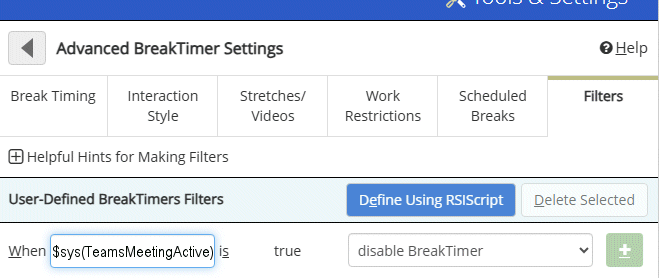
  • Added ability to create a BreakTimer Filter that pauses breaks while you are in a Microsoft Teams meeting. Previously you could set a filter to pause if you were presenting - this more broadly blocks breaks while in a meeting regardless of whether you are presenting. This is accomplished using an RSIScript filter with $sys(TeamsMeetingActive), which is true when you are in a Teams Meeting and false otherwise. To set up, visit BreakTimer Filters, click on Define Using RSIScript, and configure it like this:


    (RSIG-1433)

  • Significantly improved ability to navigate fields on a webpage in Google Chrome or Microsoft Edge. You can move the mouse to a field, click on it, and type via RSIScript. For example, the script:

    activate Edge
    mouse absmove screen $findhtmlid(LoginField)
    mouse click
    type myusername
    would bring Microsoft Edge to the foreground, move the mouse to a field whose ID was 'LoginField' and click in that field and type 'myusername'. (RSIG-1456)

  • Minor security enhancement to administrator access password system. (RSIG-1452)

Fixes:

  • Corrected an issue that caused RSIGuard to display blank windows on startup if there was an excessive delay connecting to a network. (RSIG-1434)

  • Corrected an issue with $sys(timezone) where it could be off by 30 minutes or 1 hour. (RSIG-1439)

Click here to view release notes for all versions of RSIGuard.